Size
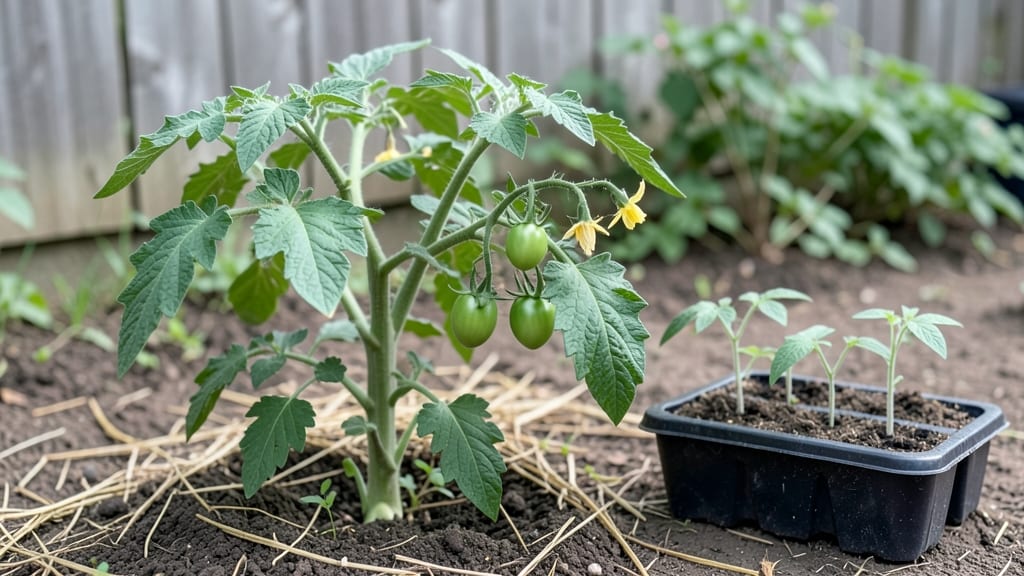
My free online garden blueprint starts with nothing but curiosity and a few hours of planning—no budget required. 🌱 The internet is packed with free tools, seed swaps, and step-by-step guides that make growing food or flowers accessible to anyone, even in small spaces or tight budgets.
You’ll need just three things: a container or patch of ground, free seeds from local swaps or online forums, and a smartphone for apps like Gardenate or PlantNet to track planting times.
Most beginners overlook how much free knowledge exists—YouTube tutorials, library books, and community forums like r/Gardening offer everything from soil prep to pest control without spending a dime.
By the end of your first season, you’ll harvest fresh produce or vibrant blooms while saving money and reducing waste. The best part? You’ll join a global community of gardeners sharing tips, seeds, and even cuttings—all for free. Let’s turn your screen time into green thumbs.
This method works year-round, whether you’re growing in containers, raised beds, or directly in the earth. No fancy tools or expensive soil mixes needed—just creativity and a willingness to learn. Ready to grow?
📚 In This Guide
- What you need
- Instructions
- Tips and common mistakes
- Wrapping up and next steps
What you need
- ● Containers or Garden Beds: 5–10 5–10 gallon pots (for herbs/veggies) or 1 large raised bed (4’x8’) (for bigger plants).
- ● Window boxes (if growing on a ledge).
- ● Growing Medium: 1–2 bags of potting soil (sterilized, peat-free if possible).
- ● Compost (1–2 cubic feet for nutrient boost).
- ● Seeds or Seedlings: 5–10 seed packets (e.g., lettuce, tomatoes, basil, marigolds).
- ○ 3–5 young seedlings (optional, for faster growth).
- ● Watering Supplies: 1 watering can (with a long spout).
- ● Hose with adjustable nozzle (for larger gardens).
- ● Basic Tools: 1 hand trowel (for planting/weeding).
- ● 1 pruning shears (for trimming).
- ● 1 gloves (to protect your hands).
- ● Mulch (to retain moisture and suppress weeds).
- ● Garden markers (to label plants).
- ● Trellis or stakes (for climbing plants like cucumbers).
- ● Organic fertilizer (e.g., fish emulsion or compost tea).
- ● Grow lights (if indoor gardening in low-light areas).
How to start your free online gardening journey
This blueprint turns your digital space into a thriving garden—no physical plot required.
🌱 Step 1: Choose Your Online Gardening Platform
Begin by selecting a platform that aligns with your goals. Free options like Gardening Simulator or Stardew Valley (with mods) offer immersive, beginner-friendly experiences. I recommend starting with Gardenate for real-world planning—it provides free frost date calculators and plant compatibility tools without requiring a subscription.
If you prefer hands-on virtual gardening, explore Google Earth's Timelapse feature to observe real global gardens changing over decades. This visual tool helps you understand seasonal patterns before committing to any platform. Avoid overcomplicating your choice—stick to one free platform to master its features before exploring others.
☀️ Step 2: Design Your Virtual Garden Layout
Sketch your garden design using free tools like SketchUp Free or even paper and pencil. Focus on creating zones for sun-loving plants, shade-tolerant varieties, and edibles. I like to start with a 4'x4' square layout—it's manageable for beginners while allowing room for experimentation.
Use the platform's built-in tools to map sunlight exposure. Most free simulators let you adjust your virtual location's latitude to match real-world sun angles. Pay attention to wind patterns too—virtual gardens often let you simulate this with simple adjustments. This step ensures your digital garden will thrive just like a real one.
💧 Step 3: Select Free Plant Resources and Learn Growth Cycles
Leverage free resources like the USDA Plant Database or Missouri Botanical Garden's PlantFinder to select plants. Focus on species with short growth cycles—like lettuce or radishes—to see quick results. I recommend starting with 4-6 varieties to avoid overwhelm.
Use free apps like GrowVeg to track growth stages. These tools provide daily reminders for watering, fertilizing, and harvesting—just like having a virtual gardening assistant. Pay special attention to days to maturity—this determines when you'll see your first harvest in the simulator.
⏰ Step 4: Implement Seasonal Adjustments and Maintenance
Most free gardening platforms let you simulate seasonal changes. Adjust your virtual garden's calendar to match your local climate zone. For example, if you're in Zone 7, set your simulator to reflect 60-90 frost-free days—this ensures realistic growth patterns.
Practice virtual maintenance tasks like pruning, weeding, and pest control. I find that using a 10-minute daily maintenance routine—even in a simulator—builds real-world gardening intuition. Watch how plants respond to your virtual care; this prepares you for handling real plants with confidence.
🌿 Step 5: Transition to Real-World Gardening
Once comfortable with your virtual garden, apply your knowledge to real plants. Start with easy-to-grow species like basil or marigolds—they're forgiving for beginners. Use the skills you honed in your simulator: timing watering, recognizing pests, and adjusting for light.
Keep your virtual garden running alongside your real one. Compare growth patterns, harvest times, and challenges. This dual approach helps you refine your techniques. Remember, the goal isn't perfection—it's learning through practice, whether virtual or real.
Tips & tricks for perfect online garden design
A few strategic moves can transform your virtual gardening experience from frustrating to fulfilling. The key is leveraging the digital tools available to create a realistic, engaging garden that teaches you real-world skills.
Platform-Specific Shortcuts: Each free platform has unique features that can save you time. In Gardenate, use the "Plant Finder" tool to instantly see which plants thrive in your specific climate zone—no guesswork required. For Stardew Valley users, enable the "Quick Plant" mod to accelerate growth cycles while still learning proper spacing techniques. This lets you experiment with more varieties without waiting weeks for real-world growth.
Design Efficiency: When sketching your 4'x4' layout in SketchUp Free, use the "Component" tool to create reusable plant groups. This lets you test different arrangements without redrawing everything from scratch. I also recommend setting up a "sunlight audit" early—most simulators let you overlay sun path diagrams. This visual reference prevents common mistakes like placing shade plants where they'll never get enough light.
Resource Cross-Referencing: Combine the USDA Plant Database with your simulator's growth charts for maximum accuracy. For example, if the database shows lettuce matures in 30 days but your simulator says 25, adjust your expectations accordingly. This cross-checking builds your ability to interpret real-world plant data—critical when you transition to physical gardening. The GrowVeg app's daily reminders also sync perfectly with simulator alerts, creating a seamless learning loop.
Real-World Preparation: Use your virtual garden's maintenance tasks to practice skills you'll need physically. When simulating pruning in Stardew Valley, pay attention to how much you can remove without stressing the plant—this translates directly to real-world hedge trimming. The 10-minute daily routine mentioned in Step 4 isn't just about the simulator; it's about training your eye to recognize when plants need attention, whether virtual or real.
Pro Tips for Grow A Garden Free Online
- A few strategic moves can transform your virtual gardening experience from frustrating to fulfilling.
- Platform-Specific Shortcuts: Each free platform has unique features that can save you time.
- Design Efficiency: When sketching your 4'x4' layout in SketchUp Free, use the "Component" tool to create reusable plant groups.
Frequently asked questions
Got questions? You’re not alone! Here are some of the most common concerns about growing a garden online—plus quick, practical answers to get you started.
How much space do I really need to start a garden online?
Even a small space works! Many online gardening programs (like Gardenize or Planter) let you design gardens for balconies, windowsills, or tiny yards. Start with just a few plants—herbs or leafy greens thrive in containers as small as 6 inches wide. Pro tip: Use vertical space with wall planters or hanging pots to maximize room!
Can I grow a garden online year-round, or is it seasonal?
Online tools help you plan year-round, but real-world growing depends on your climate. Most platforms suggest planting times based on your ZIP code. For cold regions, focus on cold-hardy crops (like kale or spinach) or use indoor hydroponics. Hot tip: Many apps include frost-date alerts to guide your timing!
Is there really a free way to grow a garden online?
Yes! While some premium tools offer advanced features, free alternatives like Gardening Know How’s Plant Files or Google’s Garden Planner provide basic layouts. YouTube tutorials and community forums (like r/Gardening) also offer free guidance. Budget hack: Repurpose household items (e.g., egg cartons for seedlings) to cut costs!
What if my online garden plan fails? How do I troubleshoot?
Plans are just guides—adjust as needed! Common fixes:
Plants wilting? Check soil moisture (overwatering = root rot!).
Pests appearing? Use neem oil or companion planting (e.g., marigolds repel bugs).
Slow growth? Verify sunlight exposure (most veggies need 6+ hours/day).
Online tools often include diagnostic checklists—use them!
Can I grow a garden online if I live in an apartment with no outdoor space?
Indoor gardening is booming. Try:
- Herbs (basil, mint) in sunny windows.
- Microgreens under grow lights.
- Hydroponic kits (like AeroGarden) for compact setups.
Apps like PlantSnap help identify light spots in your home. Urban tip: Rotate plants weekly to ensure even growth!
Wrapping up and next steps
Growing a garden from scratch doesn’t have to be intimidating—especially when you have free online resources to guide you every step of the way! 🌱 Whether you’re a complete beginner or just looking to refine your green thumb, the tools and knowledge are at your fingertips.
Start small, stay consistent, and watch your garden (and confidence!) flourish.
Ready to dig in? Pick your first project—whether it’s a windowsill herb garden, a raised bed, or a full backyard oasis—and take that first step today. Your future self (and your taste buds!) will thank you.